
Your Inquiry About a Property
This page lets you see the replies to the inquiry you made about a property and continue the conversation with the real estate agency.
Overview
When you sent an inquiry about a property, you received a unique link to this page where you can:
- View the details of the property you were interested in
- Read the real estate agency's replies
- Continue the conversation by sending more messages
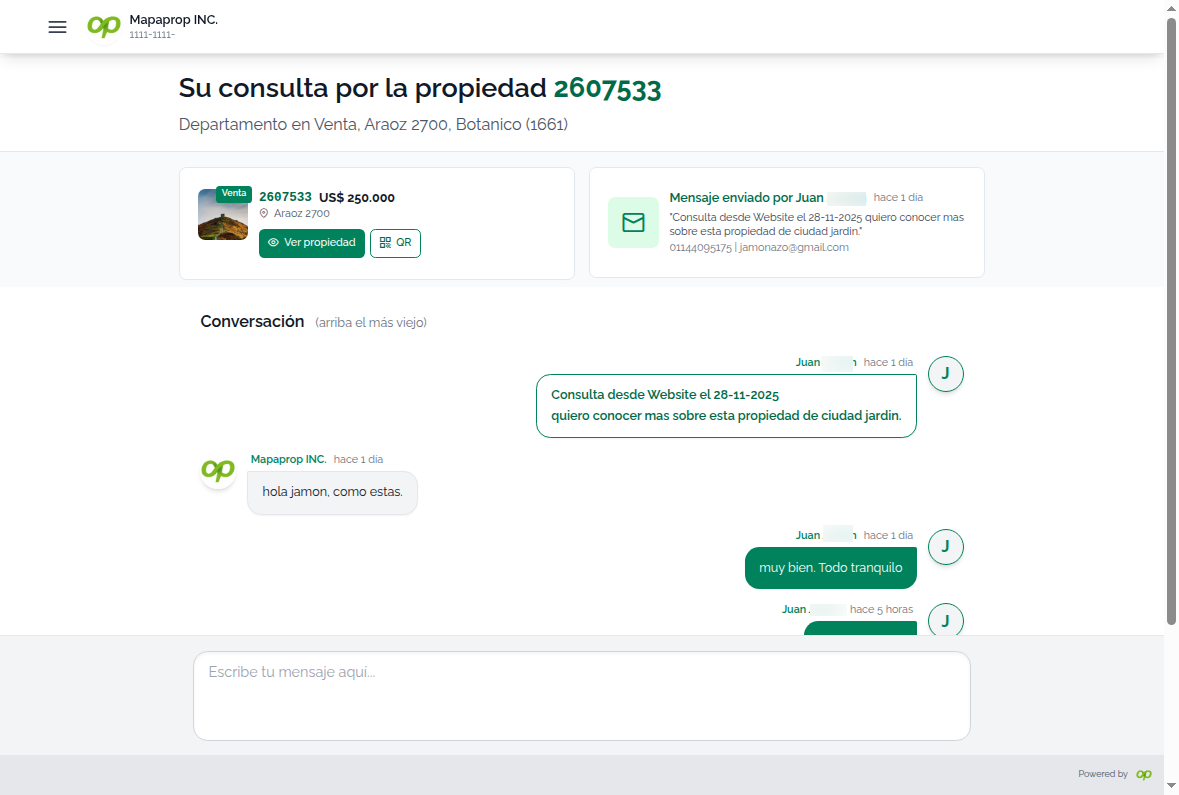
Page sections
Property Card
Shows a summary of the property you inquired about:
| Item | Description |
|---|---|
| Code | Unique identifier of the property |
| Type and Operation | E.g.: "Apartment for Rent" |
| Location | Address, neighborhood, and city |
| Image | Main photo of the property |
Tip: You can click on the card to see more details about the property.
Your Original Inquiry
Shows the inquiry you sent:
- Your name and contact details
- The question you asked
- Date and time of your inquiry
Message Chat
The main area where you can:
- View the replies sent to you by the real estate agency
- Write new messages to continue the conversation
- Send files if you need to share something
Messages update automatically every 30 seconds, so you'll see the replies without needing to reload the page.
How to send a message
- Type your message in the text field at the bottom
- Click Send or press Enter
- Your message will appear immediately in the chat
If the property is no longer available
If the property was taken down or sold/rented:
- You'll be able to view the history of previous messages
- You won't be able to send new messages
- A notice indicating this situation will appear
Frequently asked questions
Is my data safe?
Yes, this page is private and only you can access it through the unique link you received.
How long can I use this chat?
As long as the property is published, you can keep sending messages.
Does the real estate agency have my contact details?
Yes, they can see the name, email, and phone number you provided when you made the original inquiry.
How do I know if I got a reply?
Messages update automatically. You can also receive email notifications if the real estate agency has them configured.
Need more help? Contact the real estate agency directly using the details shown in the side menu.