
Know where each sign is, what condition it is in and who owns it
The Signs module manages the physical stock of outdoor signs: the ones placed on the properties you market, with your logo, your brand or your contact details.
The system lets you know how many signs you have, where each one is right now, and keep the complete history of their movements between the warehouse, your branches, the properties and the workshop.
The module requires the Pro+ plan or higher. Without that plan you can view the inventory, but the buttons to create signs, create sign types and schedule work orders will offer you the plan upgrade.
Three different things about the same sign
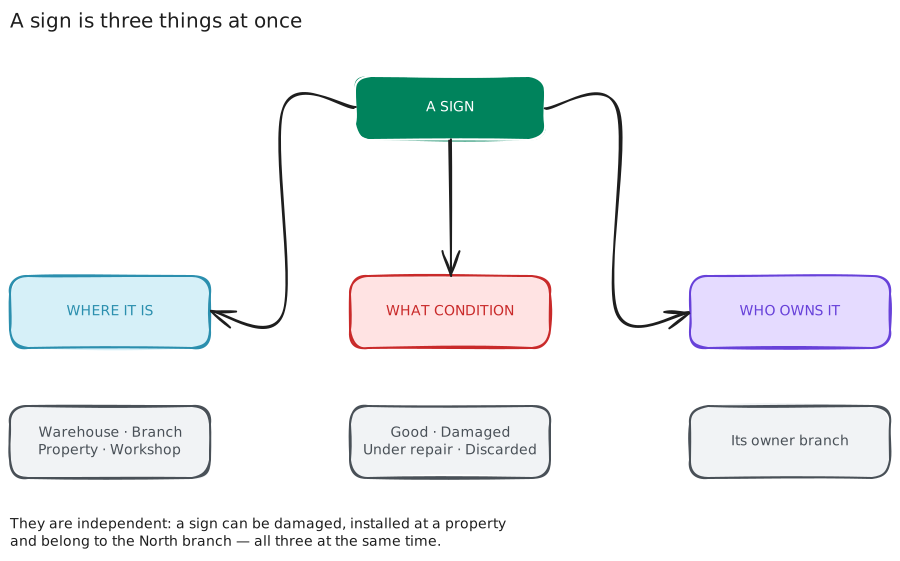
This is the core idea of the module, and understanding it makes everything else explain itself. For each sign, the system stores three independent pieces of data:
| What it answers | Values | |
|---|---|---|
| Where it is | the physical location right now | Warehouse · Branch · Property · Workshop / Third party |
| What condition it is in | whether it is usable | Good · Damaged · Under repair · Discarded |
| Who owns it | which branch is the owner | any of your branches |
They are independent: a sign can be damaged, placed on a property and belong to the North branch, all three at the same time.
Moving a sign does not change who owns it. If you store a sign from Head Office at the North branch, it still belongs to Head Office. To change the owner there is a separate, explicit action: Transfer. See Where a sign is.
The module's screens
- Signs console: the starting point. How many signs you have and where they are, the scheduled work orders and the latest movements.
- Sign inventory: the complete listing, with
search and filters.
- New sign: how to add a sign.
- Sign Types (Models): the catalog you have to create before the first sign.
- Sign details: a sign's data, its history and the actions
you can perform on it.
- Where a sign is: moving it between locations, and transferring it to another branch.
- Sign photo: uploading it, changing it or deleting it.
- Schedule an installation, removal or move:
how to schedule a work order with a date and an installer, and how to confirm it once it is done.
- Work order list: the complete record of every work order, including the ones already closed.
- Installers: the people or companies that do the work.
- You can also manage the signs of a specific property from its page, Signs tab — see Advertising Signs.
If this is your first time
Start with the Quick start guide.
Inside the system, in the Signs console, the View the guide button opens the same explanation on screen and marks which step you are on.
Support
If you have any difficulty with this help article, you can report a problem by clicking here