
The Mapaprop AI module runs on tokens and is available from the Mapaprop Plus plan. Each plan includes a monthly token quota: Plus 10,000, Pro+ 100,000, and Business 400,000. The Mapaprop Free plan does not include AI tokens.
AI Services
Centralized control panel to monitor and manage the use of artificial intelligence tokens across all Mapaprop services.
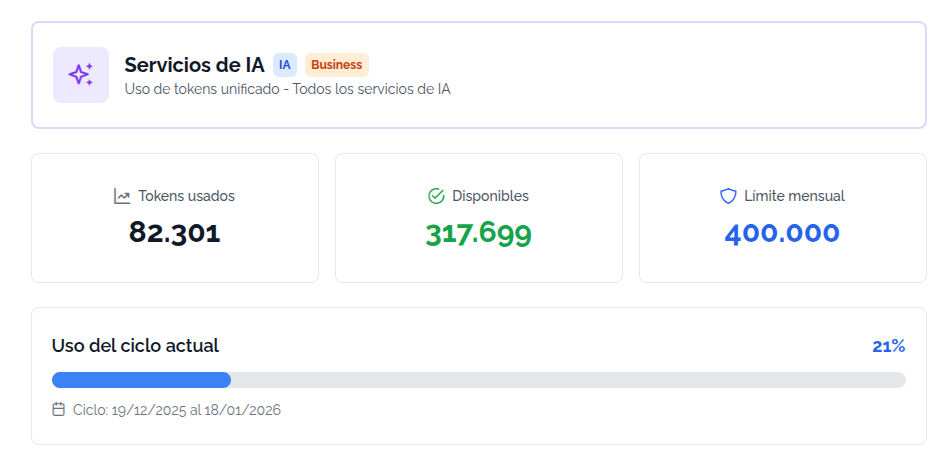
Overview
This page unifies the consumption of all AI services in a single place, showing:
- Tokens used in the current cycle
- Tokens available remaining
- Monthly limit according to your plan
- Breakdown by service (Chat AI, Descriptions, Titles, Highlights)
- Usage history with detail of each operation
What are tokens?
Tokens measure the consumption of artificial intelligence services:
- 1 token ≈ 4 characters of text
- They renew automatically every month according to your billing cycle
- The system unifies MapapropAI and ChatAI into a single shared pool
- You can see the breakdown by service to optimize your usage
Access requirements
To access the AI services you need a plan:
- Plus (includes monthly tokens)
- Pro+ (higher amount of tokens)
- Business (maximum token capacity)
If you don't have a compatible plan, you will see a restricted access message with a button to view the available plans.
Sections of the page
1. Summary cards
Three main indicators:
| Metric | Description |
|---|---|
| Tokens used | Total consumed in the current cycle |
| Available | Tokens remaining until the next cycle |
| Monthly limit | Amount included in your plan |
2. Progress bar
Shows the usage percentage of the current cycle:
- Blue (0-74%): Normal usage
- Orange (75-89%): High usage
- Red (90-100%): Tokens almost exhausted
If you are close to the limit (>80%), you will see an alert suggesting an upgrade or waiting for the automatic renewal.
3. Usage by service
Detailed breakdown of tokens consumed by each service:
| Service | Description |
|---|---|
| Chat AI | Conversations with clients on your website |
| Descriptions | Generation of descriptive texts for properties |
| Titles | Creation of optimized titles |
| Highlights | Generation of highlight points |
Each service shows:
- Tokens consumed
- Number of uses performed
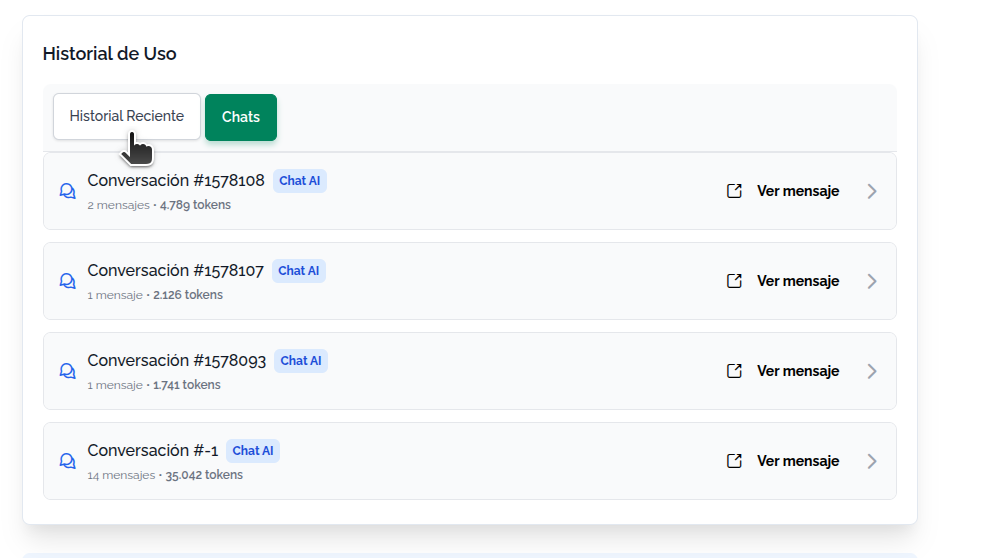
4. Usage history
Two tabs to visualize the activity:
"Recent History" tab
Complete table with all the logs of AI service usage:
| Column | Description |
|---|---|
| Date | Moment of the operation |
| Service | Type of service used (Chat, Description, etc.) |
| Tokens | Amount consumed in that operation |
| Time | Duration of the execution |
| Status | Success or Error |
| Actions | Button to view the chat (only for Chat AI) |
"Chats" tab
It only appears if you had Chat AI conversations. It groups the messages by conversation:
- Expandable conversation: Click to see detail of each message
- Total tokens per conversation
- Number of messages exchanged
- "View message" button: Opens the conversation in the Inbox
Page states
Without AI usage
If you have not yet used any AI service, you will see an informative message with:
- Your current plan
- List of available services
- Information that the tokens will be activated with the first use
With usage history
Once you use any service, the page will show all the sections with real data.
Loading error
If there is a problem loading the data, you will see an error message. Try reloading the page.
How to optimize token usage
Tips to manage tokens:
- Review the breakdown by service to identify what consumes the most
- Group generations: Use the AI tools when you have several properties to process
- Monitor the cycle: The tokens renew automatically every month
- Automatic alerts: You will receive notices when you are close to the limit (80% and 90%)
Available Mapaprop AI functions
The list of functions is the following
In addition, these services are also linked
Coming soon.
Mapaprop Chat AI External Web Client
The Mapaprop AI systems are based on Tokens. The tokens reset on the 20th of each month, with the plan renewal. For more details you can read Subscription system rules. To learn the Token limits you can look at this link