
Last Revision: 2025-11-19 Version: 2.2
Welcome to the Mapaprop Subscription System
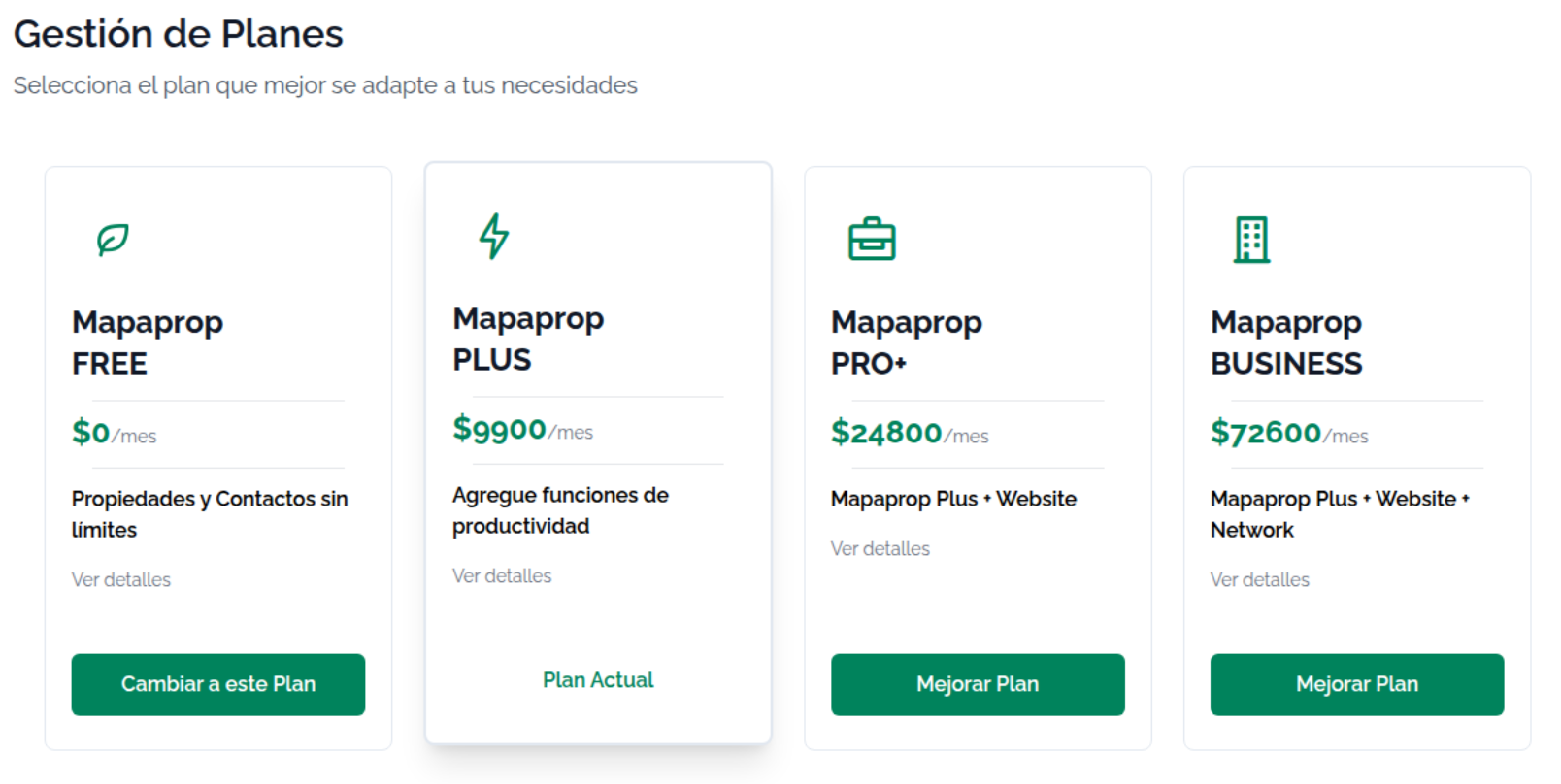
Welcome to the Mapaprop Subscription System
The Mapaprop subscription system gives you access to all the services and features our real estate management platform offers. With our flexible plan model, you can:
- ✅ Subscribe to a plan based on your needs (Plus, Pro+, Business)
- ⬆️ Upgrade whenever you need more features
- ⬇️ Downgrade if you want a more affordable plan
- ❌ Cancel your subscription at any time and go back to FREE mode
You're free to use the system your way, adapting it to your real estate business needs at any moment. There are no minimum commitments or penalties for changing plans.
It's important that you know the rules of use
Below you'll find the subscription system rules that will help you understand:
- How billing cycles work
- What happens when you subscribe, upgrade, or downgrade
- How charges and credits are calculated
- What happens to your data when you cancel
- Special cases and frequently asked questions
Read these rules carefully to make the most of your subscription and avoid surprises on your billing.
Billing Cycle
Key Dates
- Day 20: Monthly billing (start of the new cycle)
- Day 21 to 19: Active usage period
- Day 19: Last day of the billing cycle
Example
Your cycle runs from the 20th of one month to the 19th of the next:
[──────── 30 days of service ────────][Invoice]
 Jan 20   ...   Feb 10   ...   Feb 19   Feb 20
Subscribing to a New Service
Proration Rule
When you subscribe to a service for the first time, you only pay for the remaining days until the 19th of the current month.
Calculation
Full month price: $10,000
Price per day: $10,000 ÷ 30 = $333.33
Remaining days (from the 10th to the 19th): 10 days
Charge TODAY: $333.33 × 10 = $3,333
From day 20 onward
The full service price ($10,000) is billed for the new cycle (Jan 20 to Feb 19).
Upgrade (Switching to a Better Plan)
What is it?
Switching from a cheaper plan to a more expensive one within the same month.
Proration Rule
You only pay the price difference, prorated up to the 19th.
Example
You have: PLUS
You want: BUSINESS
Price difference prorated by remaining days

Today is the 10th, 10 days remain until the 19th
Charge TODAY: Price difference × 10 days
Benefits
- ✅ Immediate access to the new plan's features
- ✅ You only pay the difference until the 19th
- ✅ Your previous plan is cancelled automatically
From day 20 onward
The full price of the new plan is billed.
What happens if I do multiple upgrades in the same month?
If you do several upgrades on the same day or within the same month, the system only charges the difference between each plan.
Practical example:
Today is day 12 of the month (8 days remaining until the 19th):
1. You subscribe to PLUS ($9,900)
   → You pay: $2,640 (8 days of PLUS)

2. Same day, you upgrade to PRO+ ($24,800)
   → You pay: $3,973 (only the 8-day difference)

Total paid TODAY: $6,613
Verification: 8 full days of PRO+ = $6,613 ✅
Result:
- ✅ You pay exactly what corresponds to the final plan
- ✅ You DON'T overpay or underpay
- ✅ There's NO double charge for the same period
- ✅ Each upgrade only charges the incremental difference
Downgrade (Switching to a Lower Plan)
What is it?
Switching from a more expensive plan to a cheaper one.
Rule: No Immediate Charge
The downgrade does NOT generate a charge or credit on the day you request it.
Why?
To avoid complex refunds. Instead, you keep using your current service until the end of the cycle.
Flow
Today Jan 10: You request a downgrade from BUSINESS to PLUS

System:
1. Your BUSINESS plan stays active until Jan 19
2. NO charge or credit is generated today
3. On Jan 20: Your PLUS plan begins
4. Jan 20 invoice: Full price of the PLUS plan
Benefits
- ✅ You get the full value of what you already paid
- ✅ You don't lose service days
- ✅ The change takes effect at the start of the next cycle
Do I lose the days I already paid for if I downgrade?
No. The days you already paid for are fully honored.
Detailed example:
Oct 20: You pay for BUSINESS ($300) - full month
Nov 5: You schedule a downgrade to PLUS

What happens?
→ Nov 5-19: You use BUSINESS normally (14 days)
→ You get the full value of the paid month
→ Nov 20: Automatic switch to PLUS
→ Next invoice: $100 (PLUS)
Result: You DON'T lose any paid day of the higher plan. ✅
Subscription Cancellation
Rule: Deferred Cancellation
Your service is NOT deactivated immediately. It stays active until the 19th.
Flow
Today Jan 10: You cancel your subscription

System:
1. ✅ Service active until Jan 19
2. ❌ NO billing on Jan 20
3. ❌ Your service is deactivated on Jan 20
Benefits
- ✅ You get the full value of what you already paid
- ✅ You don't lose service days
What happens to my integrations and data?
When you cancel your subscription, the system performs a cleanup of services associated with the cancelled plan:
Connected Portals (ZonaProp, MercadoLibre, Cabaprop, etc.):
- ❌ The connection stored in Mapaprop is deleted
- ❌ The associated information stored in Mapaprop is erased
- ⚠️ Listings on external portals are NOT automatically unpublished — they will remain active according to each portal's policies
Social Media Links (Instagram, Facebook, Google, etc.):
- ❌ The connection is removed from Mapaprop
- ❌ The associated data is erased from Mapaprop
- ⚠️ The links on social media platforms are NOT modified — they remain as you configured them on each platform
Collaboration Networks (Networks):
- ❌ Connections to networks are removed
- ❌ Your properties are unpublished from the networks you participated in
- ⚠️ If you're the creator of a network with other members, check with support before cancelling
AI Services:
- ❌ Access to AI generation is deactivated on day 20
- ❌ Remaining tokens are lost (they don't roll over or get refunded)
- ✅ Previously generated content is kept (descriptions, etc.)
- ✅ Usage history is preserved for reference
Your Data in Mapaprop (NEVER deleted):
- ✅ Properties: Kept complete in your account
- ✅ Contacts and leads: Preserved unchanged
- ✅ Configuration: Kept for future reactivation
- ✅ History: Your entire history is preserved
Can I reactivate my service afterward?
Yes, you can reactivate at any time:
- Log in to your account (you still have access with the FREE plan)
- Subscribe again to the plan you want from
/config/upgrade - Manually reconnect your integrations (portals, social media, etc.)
- Set up your listings again as needed
Your data stays intact:
- ✅ Properties: All saved unchanged
- ✅ Contacts and leads: Fully preserved
- ✅ Configuration: Kept for reactivation
- ✅ History: No information lost
Important
When you cancel your plan:
- ❌ You lose access to premium features starting day 20
- ❌ Saved connections are removed (portals, social media, networks)
- ❌ Associated services are deactivated (depending on the cancelled plan)
- ❌ AI services are deactivated and remaining tokens are lost
- ✅ Your data is NEVER deleted (properties, contacts, leads)
- ✅ AI-generated content is kept (descriptions created)
- ✅ You can reactivate whenever you want without losing information
Watch out with external portals:
- Listings on ZonaProp, MercadoLibre, etc. are NOT automatically unpublished
- You must manage them manually from each portal if you want to remove them
- Networks: Properties ARE unpublished from collaborative networks
Cancelling a Scheduled Change
What is it?
If you scheduled a downgrade or cancellation and change your mind BEFORE day 20, you can cancel that scheduled change.
How to do it?
- Go to your subscriptions panel (
/config/upgrade) - You'll see an alert message indicating the scheduled change
- Click the "Cancel change" button
- Confirm the action
- Your current plan will continue normally with no changes
When can I cancel a scheduled change?
- ✅ You can: Cancel scheduled changes that HAVE NOT been executed yet (before day 20)
- ❌ You can't: Cancel a change that has already been executed (after day 20)
What happens after cancelling?
Once the scheduled change is cancelled:
- ✅ Your current plan remains active
- ✅ There's no longer a scheduled change for day 20
- ✅ You can upgrade, downgrade, or cancel again
- ✅ All plans become available again
Example
Nov 5: You schedule a downgrade from BUSINESS to PLUS
Nov 10: You change your mind

Action:
→ Click "Cancel change" in your panel
→ System clears the scheduled change
→ BUSINESS remains active normally
→ You can make any change again
Plan Hierarchy
Available Plans
| Plan | Description | Key Features | AI Tokens |
|---|---|---|---|
| FREE | Free plan | Basic property management | - |
| PLUS | Professional management | Management + API + Multi-user + AI | 10,000/month |
| PRO+ | Plus + Website + Reports | Everything in Plus + Website + Advanced reports | 100,000/month |
| BUSINESS | Top level | Everything in Pro+ + Collaboration Network | 400,000/month |
| BUSINESS MANAGER | Chains and franchises | Everything in Business + Multi-branch management | 400,000/month |
AI Services
Paid plans include AI Services with monthly tokens for:
- 🤖 Description generation: Automatically creates professional property descriptions
- 📸 Image analysis: Detects features from property photos
- ✍️ Writing assistant: Improves and optimizes your texts
How do tokens work?
- Each generation consumes tokens based on complexity
- Tokens renew automatically every month (day 20)
- Unused tokens do NOT carry over to the next month
- You can see your consumption in real time in the control panel
Automatic Replacement
When you subscribe to a higher plan, lower plans are automatically cancelled.
Example
You have: PLUS
You subscribe to: BUSINESS

System:
- ❌ Cancels PLUS automatically
- ✅ Activates BUSINESS
- 💰 You only pay for BUSINESS (not both)
Summary of Rules
New Subscription
- ✅ Proration: full price for the remaining days until the 19th
- ✅ Immediate charge
Upgrade
- ✅ Proration: only the difference for the remaining days until the 19th
- ✅ Immediate charge
- ✅ Immediate access to the new plan
Downgrade
- ❌ No proration
- ❌ No immediate charge
- ✅ Current plan active until day 19
- ✅ Change takes effect on day 20
Cancellation
- ❌ No immediate deactivation
- ✅ Service active until day 19
- ❌ Deactivation takes effect on day 20
- ❌ No billing on day 20
Multiple Subscriptions (Advanced)
Can I have 2 plans at the same time?
In general, each plan replaces the previous one when you upgrade. However, there are two cases where subscriptions can coexist:
Case 1: Legacy plan + PLUS
If you have a legacy website/hosting plan (e.g., Website 53, Hosting 37) and also subscribed to PLUS (54), both coexist because PLUS doesn't include a website.
You have active:
- Legacy Hosting (37) → your website
- PLUS (54) → professional management

System:
- Both services active simultaneously
- Independent billing on day 20
Recommendation: You can upgrade to Pro+ or Business to unify everything into a single plan (they include a website).
Case 2: Current plan + Website+
If you have Pro+, Business, or Business Manager and need additional websites, you can subscribe to Website+ (60) as an add-on.
You have active:
- PRO+ (55) → includes 1 website
- Website+ (60) → additional website
- Website+ (60) → another additional website

System:
- 3 active websites
- Each subscription is billed separately on day 20
Important
- ⚠️ Current plans (PRO+, Business, Business Manager) automatically replace any lower plan when you subscribe
- ✅ Website+ (60) is the only plan that can coexist with current plans
- ✅ If you have questions about which plan to subscribe to, check with support to avoid duplicate charges
Important
Due Date and Grace Period
Invoices generated on day 20 have a 3-day grace period to be paid (until day 23).
Account Blocking
If you don't pay the invoice within the 3-day grace period, your account will be blocked until the payment is regularized.
Tolerance for Debt
If you accumulate unpaid months, the system will apply an automatic cancellation depending on the type of service:
- Website/Hosting Services: 4-month debt tolerance before automatic cancellation
- Management services and other plans: 2-month debt tolerance before automatic cancellation
Important: Cancellation for debt is automatic and deactivates the associated services. To avoid it, regularize your situation from your control panel.
No Minimum Commitment
You can change or cancel your plan at any time with no penalties.
Frequently Asked Questions
Can I change plans several times in the same month?
Yes, you can change plans as many times as you want. However:
- Each upgrade will generate an additional prorated charge for the price difference
- Each downgrade will be scheduled for the start of the next cycle (day 20)
Example:
Day 5: FREE → PLUS (prorated charge for remaining days)
Day 10: PLUS → BUSINESS (additional prorated charge for the difference)

Total paid this month: Sum of prorated charges
From day 20 onward: You'll only pay the full price of BUSINESS
What happens if my payment fails?
When a payment fails on Mercadopago:
- First retry: Automatic after 24 hours
- Second retry: Automatic 48 hours after the first attempt
- Third retry: Automatic 72 hours after the second attempt
- If all fail: Your subscription is suspended and you lose access to premium features
How to regularize?
- Update your payment method on Mercadopago
- Manually pay the pending invoice from your control panel
- Contact support if you need assistance
Can prices change?
Yes, plan prices may be updated periodically.
- If you already have an active plan: The price stays the same until you cancel or change plans
- For new subscriptions: The price in effect at the time of purchase applies
Note: This document is for reference. Exact prices and conditions may vary. Always check your control panel for up-to-date information.
What is a promotional plan?
Promotional plans are temporary offers with special conditions:
- Website Promo: Website at a special price
- Pro+ Promo: Full access to Pro+ with benefits
- Business Promo: Limited-feature version of Business
Characteristics:
- ⏰ Temporary conditions
- 🔄 Migration to full plans available
- 📊 You'll see specific messages in your panel depending on your case
How do I know if I have a promo plan? Check your panel under "My Subscriptions" or contact support.
What does "legacy plan" mean?
A legacy plan is a subscription from a previous model that is no longer sold:
Legacy plans include:
- Website Promo (51)
- Mapaprop Website (53)
- Business Promo (59)
- Hosting Standard, Feedback, Express Flex (32, 34, 37, 50)
Characteristics:
- They keep working normally
- They're billed on day 20 like any subscription
- They can't be subscribed to again if cancelled
- They can upgrade to current plans (Pro+, Business) from the panel
What should I do?
You can keep using your legacy plan without any issues. When you want access to more features, you can upgrade to Pro+ or Business from your subscriptions panel (/config/upgrade).
How do I know which services I have active?
In your control panel:
- Go to "Settings" → "My Subscriptions"
- You'll see all your active services
- The system will show you your main plan
You'll see information such as:
- Current plan (Plus, Pro+, Business, etc.)
- Active add-on services
- Billing dates
- Specific messages based on your configuration
Have questions? Write to us at soporte@mapaprop.com with your account email.
Will I receive confirmation of my plan changes?
Immediate confirmation:
When you make a plan change, you receive instant confirmation:
- ✅ Upgrade: On-screen confirmation + session regeneration + immediate access to the new plan
- ✅ Downgrade: On-screen confirmation with scheduled date (day 20)
- ✅ Cancellation: On-screen confirmation with effective date (day 20)
Verification in your panel:
You can check the status of your changes at any time:
- Go to your subscriptions panel (
/config/upgrade) - You'll see an alert message if you have a scheduled change
- The message will indicate:
- Type of change (downgrade/cancellation)
- Effective date
- Target plan (in the case of a downgrade)
Email notifications:
- 📧 Confirmation email for a scheduled change
- 📧 Confirmation email for an executed change
- 📧 Billing and due date alerts
Questions about a change you made?
Contact soporte@mapaprop.com with your account email.
Special Subscription Cases
Mapaprop's plan system is designed to be flexible. If you have a special setup (legacy services, promotions, or combinations of services), this section will help you understand your situation.
Do I have a special case?
You have a special case if:
- You have multiple active services (legacy plan + current plan)
- You have a temporary promotional plan
- You subscribed to an additional Website+
Special Case: I Can't Make a Change With a Pending Scheduled Change
If you have a downgrade or cancellation scheduled, you CANNOT make another change until either:
Option A: You wait for the scheduled change to execute (day 20)
Option B: You cancel the scheduled change first
Error Example
Situation:
→ You have a cancellation scheduled for day 20
→ You try to upgrade to PRO+

System error:
❌ "You already have a change scheduled for 2025-11-20"
Solution
- Option 1: Cancel the scheduled change first
- Go to your panel (
/config/upgrade) - Click "Cancel change"
- Then you can proceed with the upgrade
- Go to your panel (
- Option 2: Wait until day 20
- The change will execute automatically
- After day 20 you can make any change
Why does this restriction exist?
To avoid conflicts and ensure that:
- ✅ Your changes are processed correctly
- ✅ There's no double scheduling
- ✅ The system keeps your subscription consistent
Case 1: Website Express + Mapaprop Plus
What do you have?
- Website Express: Modern website
- Mapaprop Plus: Professional management + API
System message when you see upgrade options:
"Upgrade to Mapaprop Business and get access to the Collaboration Network plus all of Mapaprop's professional features."
What does this mean? The system recommends upgrading directly to Business to access the real estate Collaboration Network.
Case 2: Promotional Website
What do you have?
- Website under a temporary promotion
System message:
"We recommend upgrading to Mapaprop Pro+ to boost your account with more productivity features."
What does this mean? Your promotional plan can migrate to Pro+, which includes Website Express plus all productivity features.
Case 5: Website Express Only
What do you have?
- Modern Website Express
System message:
"Consider boosting your website with more productivity features by upgrading to Mapaprop Pro+."
What does this mean? You can add professional management features by upgrading to Pro+.
Case 5b: Additional Website+ (serviceId 60)
What do you have?
- Extra Website+ subscribed as an add-on service
Key rules:
- It can only be subscribed to if you already have Pro+ (55) or Business (56).
- It allows multiple active subscriptions (multiple extra websites).
- Cancellation applies to a specific subscription (subscriptionId) and doesn't affect other active ones.
Case 6: Promotional Business
What do you have?
- Promotional Business subscription (limited features)
System message:
"Unlock all the features of your promo subscription by upgrading to Mapaprop Business."
What does this mean? Your promo plan has limited features. Upgrading to full Business gets you full access to the Collaboration Network.
Case 7: Promotional Pro+
What do you have?
- Promotional Pro+ subscription (full equivalent)
System message:
"You have a promotional subscription to use all of Mapaprop Pro+'s features."
What does this mean? Your promo plan gives you full access to Pro+. For more features, you can upgrade to Business.
Upgrading Legacy Plans
Do you have a legacy plan?
You have a legacy plan if your current subscription is one of the following:
- Website Promo (51)
- Mapaprop Website (53)
- Business Promo (59)
- Hosting Standard (37), Hosting Feedback (34), Hosting Starter (32), Hosting Express Flex (50)
Do I need to do anything?
No. Your legacy plan keeps working normally. No action is required on your part.
Benefits of Upgrading
If you want access to more features, you can upgrade to current plans:
Pro+ (55):
- ✅ Next-generation website
- ✅ Professional management + API
- ✅ Advanced reports
- ✅ 100,000 AI tokens per month
Business (56):
- ✅ Everything in Pro+
- ✅ Real estate Collaboration Network
- ✅ 400,000 AI tokens per month
Business Manager (57):
- ✅ Everything in Business
- ✅ Multi-branch management
- ✅ Ideal for chains and franchises
How to Upgrade
- Go to your subscriptions panel (
/config/upgrade) - Choose the plan that best fits your business
- Confirm the change
- You immediately get access to the new features
Important:
- ✅ You only pay the prorated difference (same upgrade rule)
- ✅ You don't lose data (properties, contacts, configuration)
- ✅ Your legacy plan is automatically cancelled when you upgrade
- ✅ If you have a legacy website plan, when you upgrade to Pro+ or Business your website stays active
Support
For more information, see the Payments and Due Dates Policy.
If you want to know the details of Data Deletion, read Data Management and Deletion Rules