
Note: You can click on the images at any time to view them enlarged
Manage your profile
In menu > user > my profile, you can access your user profile editor.
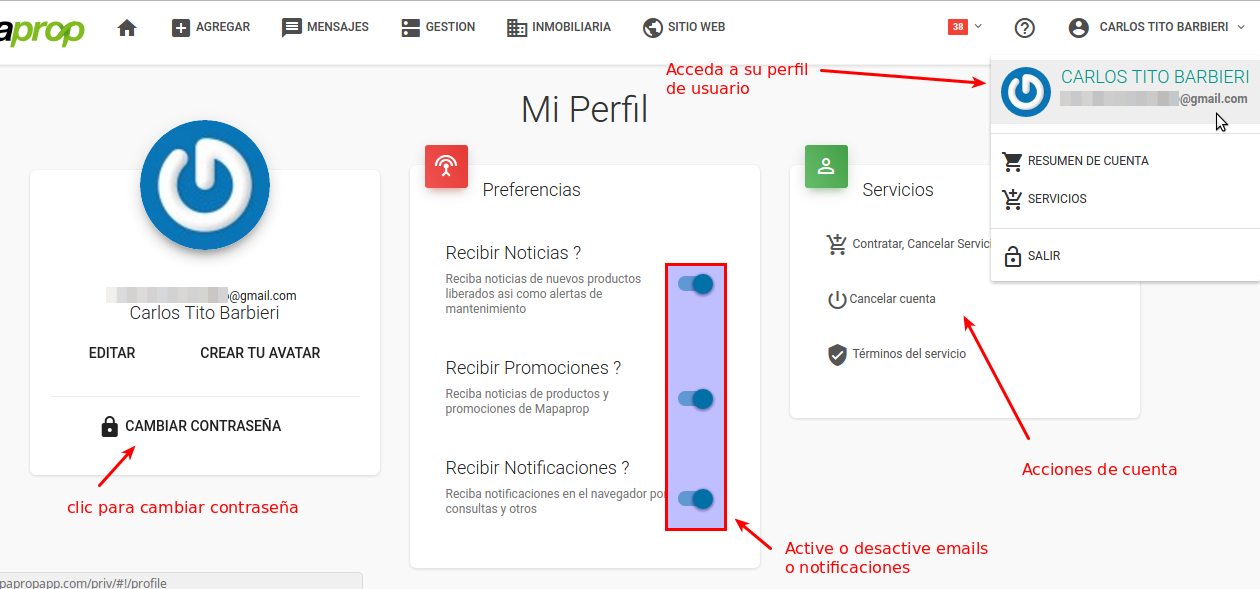
The image that appears for each user is automatic and comes from the Gravatar system, associated with the email address the user registered on Mapaprop. It comes from Gravatar. If you've ever registered with a service related to Wordpress, Automattic Inc, Gravatar, etc., you likely have an image registered at gravatar.com. You can manage that image from https://gravatar.com. Go to https://gravatar.com/ with the same user email. If you don't have a password, try resetting it. That way you'll be able to change the image that also appears on Mapaprop.
- View your user information
- Assign an Avatar (external service Gravatar)
- Change your Notification settings (notifications and promotions)
- Change password
- Cancel Mapaprop account
- Manage Plan
- View the Mapaprop Service Terms and Conditions
If your account was created by an administrator at your real estate agency, there may be some differences from the screen shown in this help article