
Note: You can click on the images at any time to see them enlarged
Configure the sending of system emails
You can configure the emails the system sends to your email inbox. The option to configure mail-sending preferences is available only at the user level (some emails cannot be avoided, such as inquiries or system charges in case you contract services)
The types of emails sent to users of a Mapaprop account are:
- News
- Promotions
- Browser notifications
- System notifications
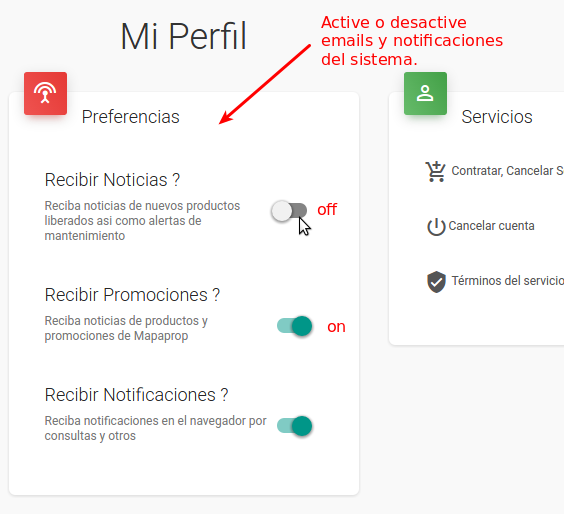
News:
System news is meant to communicate new features or updates on the use of some Mapaprop features. Accepting news emails is an option that the User can configure. News is only sent to Users of your Mapaprop account who have accepted receiving news from My profile.
Promotions:
Promotions are meant to spread the word about Mapaprop's paid tools and encourage their use. Accepting commercial promotion emails is an option that the Username can configure. Promotions are only sent to Users of your Mapaprop account who have accepted receiving promotions from My profile
Browser notifications
There's a service that lets you display notifications in your internet browser. With this option you can enable or disable those notifications
System notification emails:
In addition to Promotions and News, Mapaprop sends emails for System Notifications. System notifications cannot be configured to not be sent and are important for your account's operation. The types of notifications you may receive are:
- Account registration email (only once, sent to the initially registered email)
- Account signup confirmation email (only once, sent to the initially registered email)
- Welcome and first steps email (24 hours after confirming the account, during Argentine business hours between 9 and 10 AM): quick guide to loading your first property
- Email with available subscription plans (72 hours after confirming the account, same time): details of Plus, Pro+, and Business. Not sent if you've already contracted a paid plan.
- Weekly reminders (every Monday) if you haven't confirmed your account. If 30 days pass without confirmation, the account is automatically deleted (see Create a Mapaprop account)
- Password Reset email: (action initiated by the Mapaprop account administrator) password reset
- Password Recovery email: (action initiated by the user to restore their password)
- Alert email for accounts with no properties (every 90 days): sent to the email registered in My Company
- Alert email for a new incoming inquiry on a property in your account (sent to the email of the Branch linked to the property, but if the branch isn't the main one, a copy is also sent to the main branch)
- Billing report email for your account: sent every time a charge is made to your account, to the email registered in My Company / Branches
- Overdue guard alert email: once the guard shift expires
- Payment sent status alert email: when a payment isn't completed, it stays in sent status. The system sends you an email 4 hours after the event to notify you that you can cancel and pay again (see Pending Payments)
- Payment pending not credited status alert email: 7 days after a payment is generated, if it hasn't been credited, the system sends a notification reminding you that you can cancel and generate the payment again (see Pending Payments)
- Overdue charges reminder alert email. Every....
If you mark Mapaprop emails as Spam, given that you have options to configure your news and promotion email preferences from your Mapaprop account > My profile and from each of the emails' footers, you'll be harming Mapaprop. Because of this, Mapaprop may consider deactivating your user account. Always keep in mind the terms and conditions of service
If you have difficulties with this help article, you can report a problem by clicking here