
This help article will suggest methods for having a more useful code to manage your properties
Creating codes for your properties
In Mapaprop, every property must have a code. You are free to choose your own code, under your own rules and methods.
Use the code so your clients can more easily find the properties on Google, your website and the rest of the associated portals.
The only condition the system imposes for the general standardization of users and of our system is prefixing a user code followed by a hyphen. For example:
- If the property code is C0012, the final Mapaprop code will be the following: 725-C0012
Keep in mind that you can share the code with your clients so they can search for the property on Google, your Website or any of the associated portals. You must share the code using the described format (725-C0012)
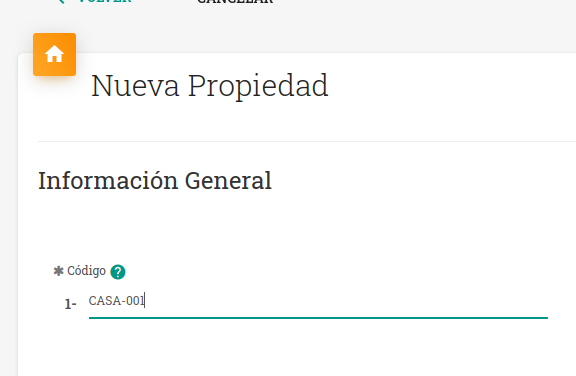
Recommendations for creating an optimal coding system
You are free to create the code you want, however, there are certain recommendations we can give you when starting a coding system from scratch.
- Try to use counters with a fixed number of characters, for example instead of using 1, 2, 3, 4, … use 0001, 0002, 0003, 0004 (4 characters) so you will have up to 9999 possibilities.
- This format will also let you sort your properties numerically.
- You can also add letters in front to indicate the property type. For example: C (for house) D (for apartment) PH (for PH) LC (for retail) LO (for lot) HO (for hotel), etc. So your code would look like this: 725-D0012
- If you have branches, you can also integrate them into the code. For example: RM (Ramos Mejia branch) HA (Haedo branch) VL (Villa Luzuriaga branch) FL (Flores branch). So your code would look like this: 725-FLD0012 or 725-FL-D0012
- Avoid using spaces.
- Avoid using hyphens (725-D00-12). Instead you can use underscores (725-D00_12)
Remember that it is recommended to add several zeros before the number (00001). This way your coding will have a longer useful life than if you use 01 02 03 (the maximum would be 99).