
Two different things: where it is and who owns it
Before moving anything, it is worth being clear about this difference, because it is the one that gets misunderstood the most:
| What it means | How it is changed | |
|---|---|---|
| Where it is | the physical location right now | Move button, or a work order |
| Who owns it | which branch manages it | Transfer button, inside Edit |
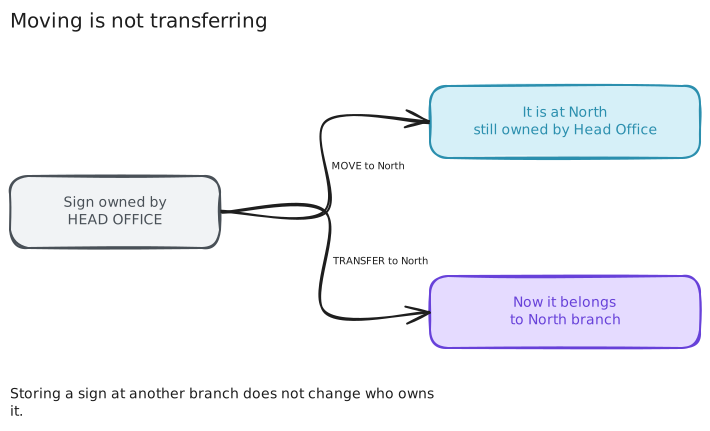
Moving a sign does not change who owns it. If you store a sign from Head Office at the North branch, it still belongs to Head Office: it appears in Head Office's inventory and Head Office manages it.
Moving a sign
From the sign details, Move button. Also from the inventory, with the ⤢ button on each row.
The four possible destinations:
| Destination | What it asks you for |
|---|---|
| Warehouse | nothing |
| Branch | which one |
| Property | search for the property |
| Workshop / Third party | a reference, so you know where it is |
You can add a note to the movement, which is saved in the history.
When to move and when to schedule
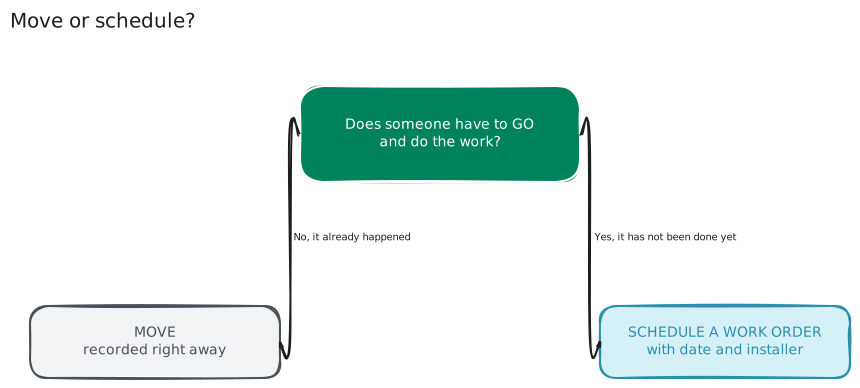
Move is for recording something that already happened: it was brought back from the workshop, it was taken to the other branch, it is already on the sidewalk.
Scheduling an order is for when the work has not been done yet and the date and who goes have to be coordinated. See Schedule an installation, removal or move.
The workshop and the condition
When you move a sign to the workshop, the movement is recorded with the reason "Going for repair". When you bring it back to the warehouse or to a branch, the reason says "Back from repair".
Careful: a sign's condition is a separate piece of data. A sign being at the workshop does not change its condition to "Under repair" on its own — that is set from Edit. They are independent on purpose: a sign can be damaged and still be installed on a property.
Transferring to another branch
From the details page, Edit button. At the very bottom, separate from the rest, is the owning branch block with its own Transfer button.
It is kept separate because it is not just another field on the form: it changes who manages the sign. The salesperson at the new branch becomes able to edit it, and the one at the previous branch no longer can.
That is why the system asks you for an explicit confirmation before doing it.
Transferring does not move the sign. If it was installed on a property, it stays installed there; the only thing that changes is which branch it belongs to.
Support
If you have any difficulty with this help article, you can report a problem by clicking here