
A work order is pending physical work on a sign: someone has to go and install it, remove it or move it.
If the movement already happened and you are just recording it, do not schedule anything: use Move from the sign's details page or from the inventory. See Where a sign is.
Scheduling a work order requires the Pro+ plan or higher. With any plan you can enter the module and view the inventory. See the plan comparison.
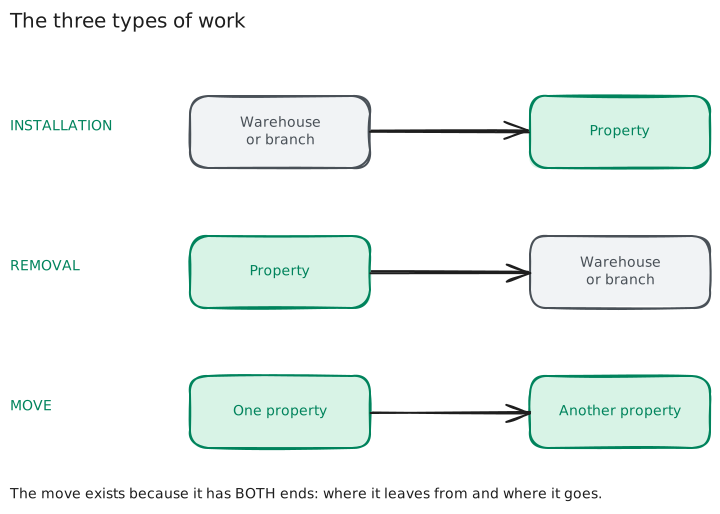
The three types of work
| Type | From | To |
|---|---|---|
| Installation ↓ | warehouse or branch | a property |
| Removal ↑ | a property | warehouse or branch |
| Move ⇄ | a property | another property |
How it is scheduled
From the console, New order button. Also from the inventory (📅 button on each row) or from a sign's details page — in those cases the sign is already selected.
First: what type of work it is
The first screen asks you what you are going to do. Choosing it first is what lets the system show you afterwards only the signs that make sense to choose.
Then: the data
The sign. A list with the signs available for that work order. For an installation, the ones in the warehouse or at a branch; for a removal or a move, the ones installed on properties.
If a sign already has a work order scheduled, it does not appear on the list — but you can tick the option to see them anyway, at the end of the listing.
A sign can have only one pending work order at a time. Two open orders on the same piece would make two installers show up looking for the same sign.
That is why, while it has one scheduled, the New order button for that sign appears disabled —both in the inventory and on its details page—, and on this list it shows as unavailable. It becomes available again when you confirm or cancel the work order it has.
You can indeed move the sign even if it has a work order scheduled. Moving records where it is right now, and does not cancel or modify the order: the work order says where to take the sign from at the moment it is looked at, so if it moved in the meantime, the order reflects that. See Where a sign is.
The list shows the signs of your branch. A yellow notice makes this clear.
If the sign you are looking for is not loaded, you can create it with the + button without leaving the dialog.
The property. For installations and moves. It is searched by code or address, and once chosen its full card is displayed.
In a removal or a move, the system also shows you which property the sign is taken from — so that the order tells the installer both ends of the job.
The date and time. Optional.
The installer. Optional. See Installers.
The notes. Any instructions for whoever does the work.
When you finish: the order is created
When you confirm the form, the screen shows you the order number and the Notify the installer button, to send it to them at that very moment without leaving that screen. Below it you have View the order, which opens its page.
If you scheduled the work without an installer, the send button does not appear: the order is scheduled just the same and you can assign one to it later from its page.
Emailing the order to the installer
There are two moments to do it, and it is the same sending:
- When you create the order, with the Notify the installer button on the confirmation screen.
- Whenever you want, from the work order's page, with the Send by email button.
The email includes your agency, the type of work, the sign, the address, the date and the notes you wrote. If the installer has their email loaded on their page, it comes pre-filled; you can still change it or add a message.
And it ends with a button: the installer opens the same work order page you see, in a read-only version, with no username or password. They can look at it, they cannot change anything or complete the work order — completing the order is still up to you. The details are in Installers.
If the installer does not have an email, the Copy link for the installer button on the work order's page copies that same link, to send it to them over WhatsApp.
Sending is manual: the system does not send the email on its own when the order is created. You decide when, and you can resend it as many times as you need.
The work order's page
Clicking on a work order —in the schedule or in the work order list— takes you to its page. At the top are the actions (confirm, cancel, send to the installer) and below, the work order in three blocks:
The sign. The piece that has to be taken: its photo, its code, its condition and the owning branch. Clicking on it takes you to its page.
The work. The two ends, one above the other:
| Where it comes from | Where it goes | |
|---|---|---|
| Installation | where the sign is stored | the property |
| Removal | the property | the warehouse or the chosen branch |
| Move | the origin property | the destination property |
When an end is a property, its card is displayed —photo, code, price and address— with a button to open it in a side panel, without leaving the order.
On an installation or a move, "where it comes from" is where the sign is right now, so it is only shown while the work order is pending: once confirmed, the sign has already moved. On a removal the origin is recorded in the order and is always visible.
Scheduling. The date, the installer, who closed it and the notes.
While the work order is pending, you can change the date, the installer, the notes and —on a removal— the destination.
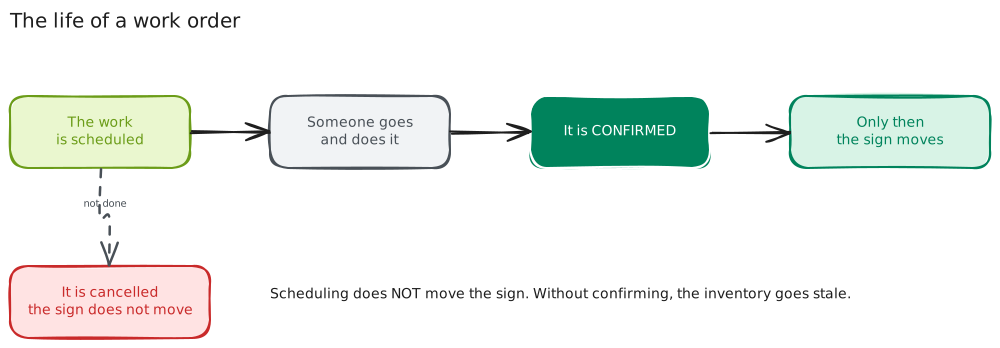
Confirming
When the work was done, Confirm. You can leave a closing note.
Confirming moves the sign and cannot be undone. That is why the system asks you for confirmation.
Only when you confirm does the sign move to its new location and the movement get recorded in its history.
Cancelling
If the work is not going to be done, Cancel. You can leave the reason. The sign does not move.
From the schedule, without going in
On the console, each work order in the schedule has the confirm and cancel buttons on the side, so you do not have to go into its page.
Support
If you have any difficulty with this help article, you can report a problem by clicking here