
From this screen you can manage one or multiple websites.
Access it from the menu
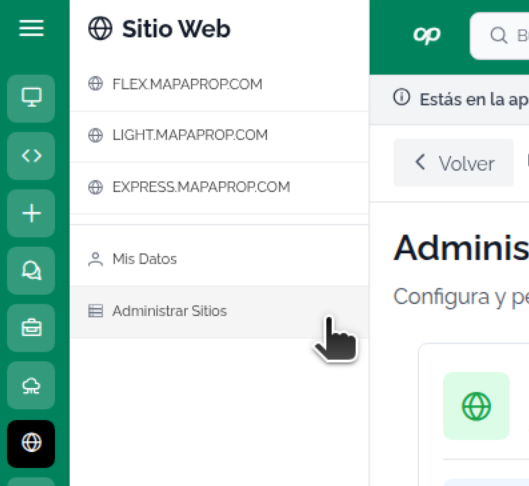
Overview
From this page you can:
- Activate websites included in your plan
- Manage active sites (configuration, domain, theme)
- Add additional sites with Website+
- View the status of your web subscriptions
- Access the complete documentation for configuration
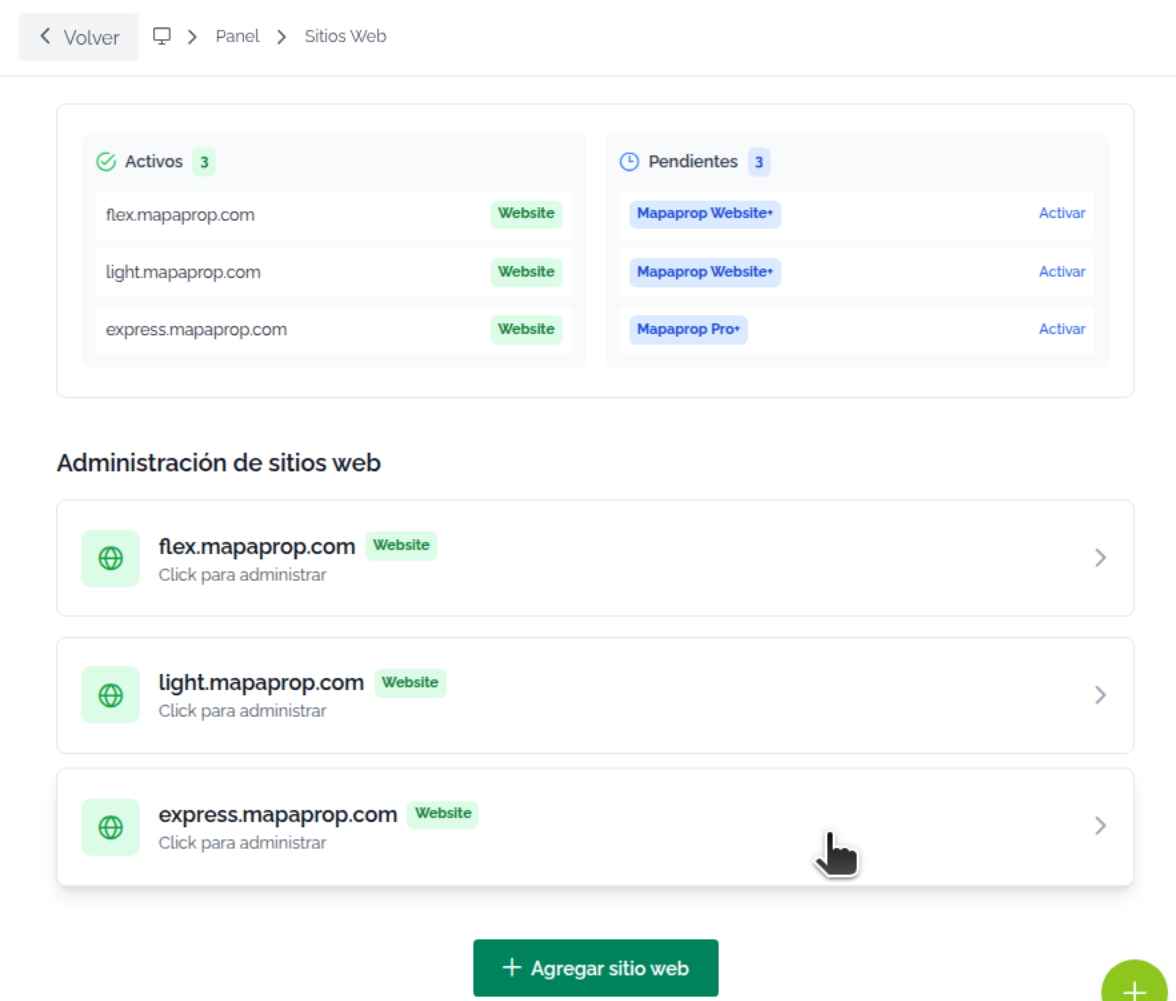
Status card
At the top you'll see a summary of your account:
| Information | Description |
|---|---|
| Active sites | Number of websites currently running |
| Pending sites | Sites included in your plan that you haven't activated yet |
| Total available | Sites you can activate according to your current plan |
Color indicators:
- Green: Active and running sites
- Yellow: Sites pending activation
- Blue: General information
Plans that include websites
The following plans include websites:
| Plan | Sites included | Description |
|---|---|---|
| Website | 1 site | Website-specific plan |
| Pro+ | 1 site | Complete plan with a site included |
| Business | 1 site | Business plan with one website included |
Note: If you have an older plan with legacy hosting, your sites keep working normally.
Activating a website
If you have sites pending activation:
- Click the "Activate website" button on the status card
- The guided activation flow will open
- Follow the steps to configure:
- Site name
- Custom domain
- Visual theme
- Initial configuration
- Once completed, the site will appear in the Active sites list
The activation process may take a few minutes. You'll receive a notification when your site is ready.
Active sites
Site list
Each active site shows:
| Element | Description |
|---|---|
| Site name | Identifier you gave the site |
| Domain | URL where it's published |
| Status | Active, In configuration, In progress |
| Activation date | When the site was activated |
| Actions | Buttons to manage the site |
Available actions
| Action | Description |
|---|---|
| View site (eye icon) | Opens your website in a new tab |
| Manage (gear icon) | Accesses the site's configuration panel |
| Settings | Advanced settings (domain, SEO, analytics) |
Website+ (Additional sites)
If you've already used all the sites included in your plan, you can add more with Website+:
What is Website+?
- Paid addon added to your current plan
- Additional cost on top of your base subscription
- 1 additional website for each Website+ you contract
- Compatible with any plan (Pro+, Business, etc.)
How to add Website+
- Click the "+ Add additional site" or "Activate Website+" button
- Review the addon's monthly price
- Confirm the contract
- The new site will be added to your available quota
- You'll be able to activate it immediately
Practical example:
- Business plan: 1 site included
- You contract 2 Website+: 2 additional sites
- Total available: 3 websites
Website Status
Your site can be in different states:
| Status | Meaning |
|---|---|
| Active | Site running and published |
| Pending | Site included in your plan but not activated |
| In progress | Activation underway |
| In configuration | Completing initial settings |
Managing existing sites
To manage an active site:
- Click "Manage" on the site you want to configure
- You'll access the administration panel where you can:
- Configure domain: Connect your own domain
- Customize theme: Colors, logo, typography
- Manage content: Pages, sections, featured properties
- SEO and Analytics: Meta tags, Google Analytics, Search Console
- Advanced settings: Forms, integrations, custom scripts
Domains
Custom domain
You can connect your own domain (e.g.: www.yourdomain.com):
- Purchase or have a registered domain
- In the site's configuration, select "Custom domain"
- Configure the DNS records according to the instructions
- Wait for DNS propagation (24-48 hours)
- The SSL certificate will be generated automatically
Required DNS records:
- A or CNAME type according to the on-screen instructions
- Specific values are shown in the configuration panel
Limits and quotas
| Plan | Sites included | Additional sites (Website+) | Maximum total |
|---|---|---|---|
| Website | 1 | Unlimited | No limit |
| Pro+ | 1 | Unlimited | No limit |
| Business | 1 | Unlimited | No limit |
Note: Although you can contract unlimited Website+, each one has an additional monthly cost.
Complete documentation
For detailed guides on configuring, customizing, and optimizing your website, visit our complete documentation:
📚 View complete website documentation
You'll find step-by-step tutorials on:
- Initial site configuration
- Theme and design customization
- Connecting your own domain
- SEO optimization
- Google Analytics integration
- Contact form configuration
- And much more
Changing or cancelling a plan
Downgrade (lower plan)
If you switch to a plan with fewer included sites:
- Your active sites will keep working
- You won't be able to activate new sites until you're within your quota
- You'll be asked to deactivate excess sites upon renewal
Example:
- You have Business (1 site) + 4 Website+ (5 active sites total)
- You switch to Pro+ (1 site)
- The 5 sites remain active until the next billing cycle
- Upon renewal, you'll need to choose which 1 site to keep active
Cancelling your subscription
If you cancel your subscription:
- Your sites remain active until the end of the paid period
- After the expiration date, the sites are deactivated
- Data is kept for 90 days for reactivation
Migrations from legacy hosting
If you have an older plan with hosting included (service ID 32, 34, 37, 50):
- Your sites keep working normally
- You don't need to do anything additional
- When upgrading to a new plan, your sites migrate automatically
- There's no downtime during migration
Frequently asked questions
Can I have more than one site with the same plan?
All plans include 1 website. To add more sites, you can contract Website+ addons.
What happens if I don't use all my sites?
No problem. The sites included in your plan are available whenever you need them. There's no obligation to activate them all.
Can I deactivate one site and activate another?
Yes. You can deactivate an active site and use that quota to activate a new one. The deactivated site's data is kept for 90 days.
Is the SSL certificate included?
Yes. All sites include an SSL certificate at no additional cost.
Can I transfer my site to another plan?
Yes. If you contract another Mapaprop plan, you can transfer your site without losing configuration or content.
Tips
- Activate your included sites: If your plan includes sites, take advantage of them. There's no additional cost.
- Connect your own domain: Give your brand professionalism with a custom domain.
- Review the documentation: Before configuring, read the full guides to take advantage of all the features.
- Set up analytics: From the start, connect Google Analytics to measure traffic.
- Optimize SEO: Complete the meta tags and descriptions to improve your search engine ranking.
- Website+ is flexible: If you need more sites temporarily, you can contract Website+ and cancel it later.