
Featured Properties Monitor - Display Feature
What is the Display feature?
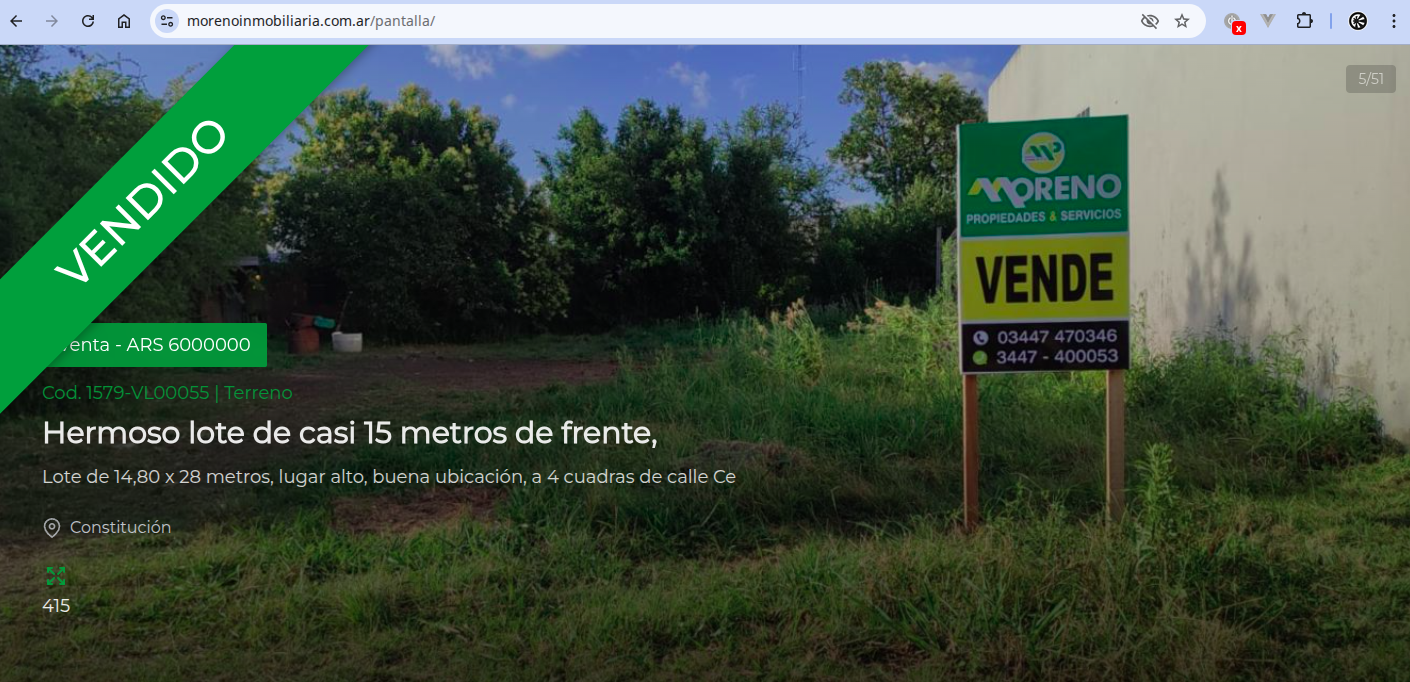
The Display feature lets you automatically show the featured properties from your real estate portfolio on a physical monitor located in your office or storefront window.
How it works
- Featured properties: Only properties you've marked as "Featured" in Mapaprop are shown.
- Automatic display: Properties are shown in an infinite-loop carousel, changing automatically.
- Adaptive design: Images and information adapt to any screen size (TV, monitor, tablet).
- Simple access: Accessed through a specific URL: /pantalla (Example: https://www.zellerinmobiliaria.com.ar/pantalla/)
Benefits
- Visual appeal: Grabs the attention of clients visiting your office.
- Automatic updates: When you edit your featured properties in Mapaprop, the monitor updates automatically.
- Professionalism: Shows your property portfolio in an elegant and professional way.
- No extra cost: Feature included with your website service.
How to set it up
- Select your featured properties in your Mapaprop panel.
- Set up a monitor or TV with an internet connection at your office.
- Open a web browser on the device and go to the URL: yourdomainname.com/pantalla
- Switch to full-screen mode (usually by pressing F11).
- Done! Your featured properties will display automatically in an infinite loop.
To get the most out of this feature, make sure you keep your featured properties updated and use high-quality images in your listings.