
Note: You can click on the images at any time to view them enlarged
Information shown on your website
Your website is directly linked to Mapaprop, and it displays the information you have entered into your Mapaprop account.
From Menu > Website > My Information, you will access My Company, where you can edit that information.
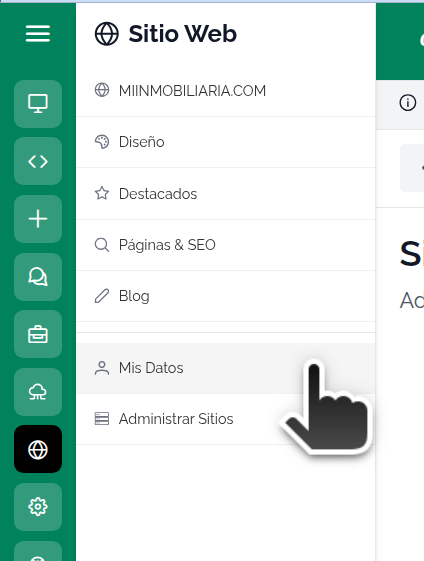
Clicking that link will take you to Menu > My Real Estate Agency > My Company.
If your website has a WhatsApp icon, keep in mind that you must have your mobile number configured in the My Company > Contact section
- All the information you enter can be searched directly through Google and other search engines.
- The Name of your real estate agency is what will appear as your website's title directly on Google, and below it your URL (e.g. www.yourdomain.com). We recommend using the full name of your real estate agency to improve your chances of being found.
- DO NOT WRITE TEXT IN ALL CAPS!!!.
- do not write your text in all lowercase only!!!
- Write phone numbers with the area code, and if you think it necessary, with the country code (+54, +34, etc.)
Add your bio and business hours to the site footer
In addition to your contact information, your website can show, in the footer (the bottom strip that appears on every page), a short bio of your real estate agency and your business hours. Both are entered from Menu > My Real Estate Agency > My Company, on the same screen where you edit the rest of your information.
Enter the bio
In My Company, open the Bio section and write a short introduction to your agency (up to 1000 characters): who you are, what you do, and what sets you apart. When you save, that text appears in your site's footer.
Enter the business hours
In the Business hours section, write your hours in free text, for example: Monday to Friday from 9am to 6pm. Saturdays from 9am to 1pm.
It's an optional field: if you leave it empty, the business hours block is not shown on the site. If you fill it in and later clear it, it stops appearing.
The bio and the business hours appear in your website's footer. If your site doesn't show these sections yet, your design may not include them; in that case, contact us and we'll take a look.