
Creating a Zoho Mail account is easy. This help article will show you how to start your Zoho account, verify your account and activate the service. It is likely that the entire signup and confirmation process will be in English. If this is the case for you, don't worry, you can change the language to your preferred language afterward.
Create a Zoho Mail account
Zoho Mail offers a free email service. The Spanish version may hide this feature. We recommend starting the signup in English and then requesting help from support to complete the activation.
1. Go to Zoho Mail
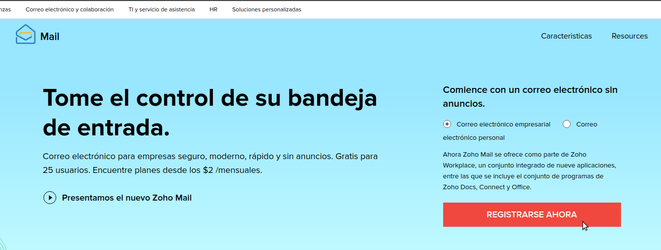
2. Choose the FREE option, click SIGN UP
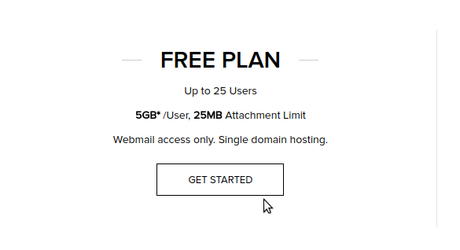
3. Fill in the details,
first enter your website's domain
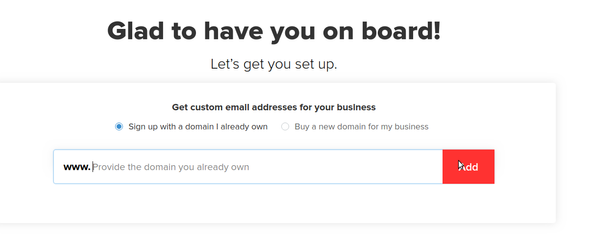
Then enter the first email address (account administrator). Also your mobile phone number
The account will be activated with a code sent by SMS
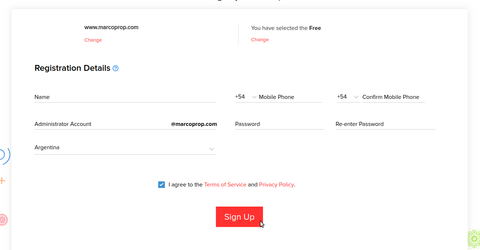
- Enter your internet domain (url)
- Enter your first and last name
- Enter a name for your main email principal@yourdomain, for example "info"
- Enter your mobile number. Keep in mind that you will receive an SMS with a code to verify your account
- Complete a password
- Click Sign Up
4. Once your Zoho.com account is confirmed you can proceed to Zohomail > Domain verification
⚠ Note: Zohomail is not a Mapaprop service, and Mapaprop provides no guarantee regarding this service, nor owns it, nor manages it. The owner of the Zoho account is you, and you are free to use it with Mapaprop or any other hosting provider.