
Zoho's business email system lets you have up to 10 email inboxes for free.
The system is very versatile, allowing you to read your mail in various ways: via webmail (through an internet browser), by downloading it with a program like Thunderbird or Outlook, or by downloading it from another web application like Gmail or Outlook.com, and finally from an app on your mobile phone.
If you're setting up an application like Thunderbird or Outlook to download your mail, Mapaprop recommends using ZohoMail > Download mail from your computer or mobile / import emails, which is the download method that will let you read emails from several devices at once, without losing your emails, which happens with the POP system
- Accessing your mail
- Zohomail > Email inbox settings
- Zohomail > Create more email accounts
- ZohoMail > Download mail from your computer or mobile / import emails
This help article will teach you how to access and use the Zohomail email configured for your internet domain
Accessing your email inbox
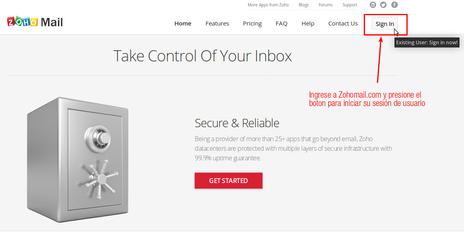
To access your email inbox, go to https://www.zoho.com/mail/ and click Sign In
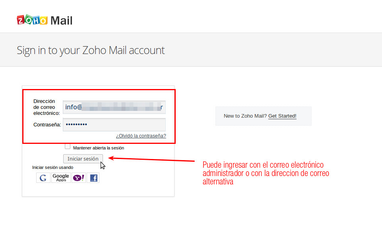
You can also go directly to https://www.zoho.com/mail/login.html. There you can enter your assigned username and password, e.g. username "info@sudominio.com" password "xxxx"
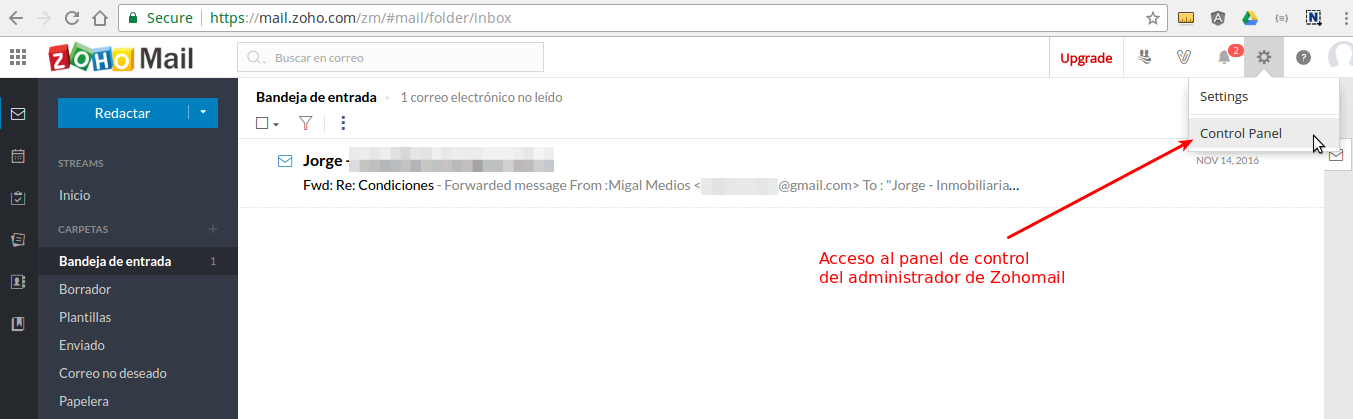
Once you log in, you'll see your inbox view. Keep in mind that Zoho offers many additional services. Use them as you see fit. At the top right you have two important shortcuts: Control Panel, which lets you Zohomail > Create more email accounts, and Settings, which lets you perform Zohomail > Email inbox settings
⚠ Note: Zohomail is not a Mapaprop service, and Mapaprop does not provide any guarantee about this service, nor is it the owner of the service, nor does it administer the service. The owner of the Zoho account is you, and you're free to use it with Mapaprop or any other hosting provider.
Zoho Mail has multiple applications, designed exclusively for managing email applications from your mobile phone or tablet, so users can check their email from anywhere, at any time.
Download ZohoMail


Zoho Mail Admin App
The Zoho Mail Admin APP is designed to help administrators manage their administration tasks from anywhere. You can manage users, reset user passwords, manage group membership, and much more from this mobile app.
Download Zoho Mail Admin App
Subpages
Zohomail > Email inbox settings
Zohomail > Create more email accounts
ZohoMail > Download mail from your computer or mobile / import emails