
If your Zoho account has already gone through Zohomail > Zoho Mail account signup, you can now start the domain verification process.
- Log in to zohomail.com
- Enter your username and password
- Activate or start activation
- Copy the records to verify
- Send the copied data by email to websites@mapaprop.com
Domain verification and email activation
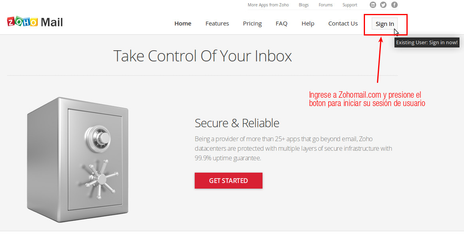
1-Log in to Zohomail.com. Click the SIGN IN button
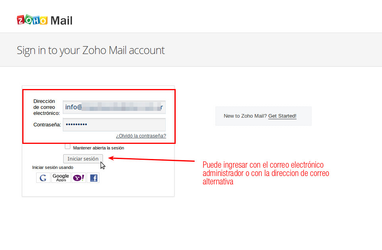
2-Enter your username and password. You can use the administrator account @yourdomain.com that you created during signup, or you can use the alternative email account used to activate your Zoho account.
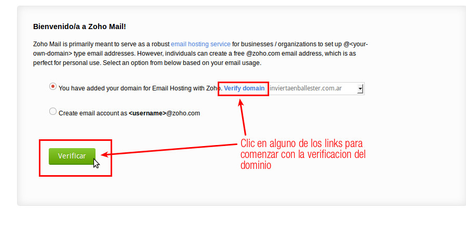
3-If you have not yet verified the domain, the following screen will appear. Start the domain verification by clicking the VERIFY button
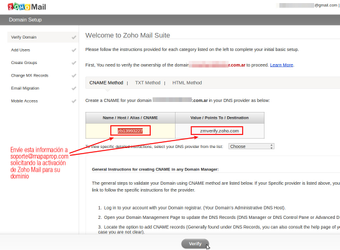
4-The following screen will show a multi-step guide. Copy and paste, into an email you will write to websites@mapaprop.com, the code from the CNAME column + the text from the VALUE column. Don't forget to include your domain name. Once the email is sent, you must wait for a reply, which may take between 24 and 48 hours.
5-Once you receive the reply from websites@mapaprop.com you can go back to Zohomail.com and carry out the Zohomail > Final activation
⚠ Note: Zohomail is not a Mapaprop service, and Mapaprop provides no guarantee regarding this service, nor owns it, nor manages it. The owner of the Zoho account is you, and you are free to use it with Mapaprop or any other hosting provider.