
Attention: You can click on the images at any time to view them enlarged
Navigation system between sections of your website (content tree)
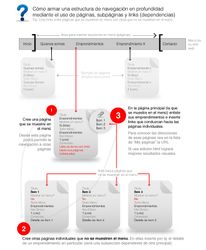
This tutorial teaches how to build navigation between pages (sections) in 3 steps
- Create a Create page that shows in the menu: From this page you'll be able to allow navigation to other pages
- Create other individual Create page pages that don't show in the menu: In them, insert, for example, the detail of a specific development (it will be a subsection dependent on a main one)
- On the main page (the one shown in the menu) list your developments and insert links leading to the individual pages: To find the addresses of those pages, look in the "My pages" list at the URL column and copy it.
If you use HTML editing you'll get better visual results
Support
⚠ If you have trouble with this help article, you can report a problem by clicking here
Mapaprop.com | All rights reserved | Follow us on Twitter